Skip to product information
1 of 9

 A Cozy Hideaway for Curious Cats 

Nexora™ Smart Automatic App Control Cat Litter Box

Nexora™ Smart Automatic App Control Cat Litter Box

Make everyday litter care more convenient with automatic cleaning functionality, Tuya Smart app connectivity and configurable controls in a modern litter box designed for your cat's routine.

⚙️ Automatic Cleaning
📱 Tuya Smart Connectivity
🌬️ Odor-Purification Function
🔒 Child Lock

Regular price Rs.59,999.00
Regular price Rs.92,000.00 Sale price Rs.59,999.00
Save Rs.32,001 Sold out
✓
7-Day Refund Policy

100% product refund for confirmed damaged or defective items.

↻
14-Day Replacement

Available for eligible products after inspection.

♧
6-Month Warranty

Coverage for applicable manufacturing defects.

➜
Free Shipping

Enjoy free delivery on your order.

View Full Return, Refund & Replacement Policy →
💵
Cash on Delivery
Pay on Delivery
↩️
7-Day Returns
Easy Returns
🔒
Secure Checkout
100% Protected
🚚
Fast Delivery
2–3 Business Days

Manual Instructions

1. Product Specifications

Product Name: Smart Litter Box
Main Material: ABS + POM
Rated Voltage: 12V – 2A
Rated Power: 8W
Litter Box Capacity: 10L
Maximum Cat Litter Capacity: 4.5L
Product Dimensions: 527 × 534 × 551 mm (usage status)
Net Weight: Approximately 8 kg
Recommended Pet Weight: The manual recommends turning off automatic cleaning for cats weighing below 1.5 kg.
App: Tuya Smart

2. Installing the Tuya Smart App

  1. Scan the QR code provided in the product manual to download the Tuya Smart app.
  2. Install and open the Tuya Smart app on your smartphone.
  3. Enable Bluetooth, location services, and your phone's 2.4 GHz Wi-Fi connection before connecting the litter box to the internet.

3. Connecting the Litter Box to the App

  1. Make sure your phone is connected to a 2.4 GHz Wi-Fi network.
  2. Turn on Bluetooth and enable location services on your phone.
  3. Open the Tuya Smart app.
  4. Select “Add Device” in the upper-right corner.
  5. Select “Add” and follow the on-screen instructions.
  6. Enter your Wi-Fi password when prompted.
  7. Complete the device-adding process in the app.

If the connection fails: Try again, check that the Wi-Fi password is correct, and confirm that the litter box is in network configuration mode. The manual indicates that the 2.4 GHz Wi-Fi status light continues flashing during the relevant connection setup state.

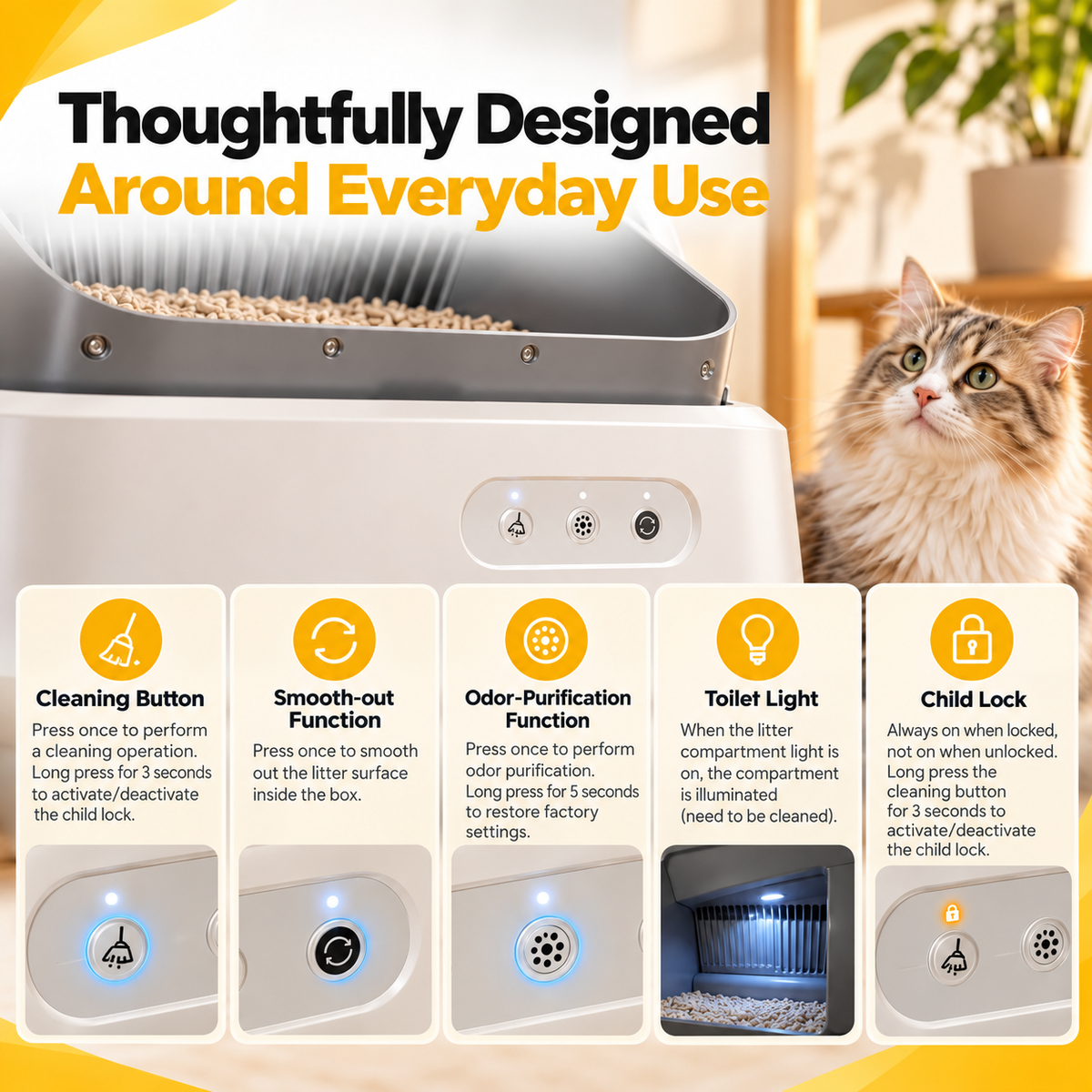
4. Button Functions

Clean Up

  • Press once to perform a cleaning operation.
  • Press and hold the cleaning button for 3 seconds to activate or deactivate the child lock.

Smooth Out

  • Press once to activate the smoothing function.

Odor-Free

  • Press once to activate odor purification.
  • Press and hold the odor purification button for 5 seconds to restore factory settings.

Child Lock

  • The child-lock indicator remains on when the lock is activated.
  • The indicator turns off when the lock is deactivated.

Wi-Fi

  • The Wi-Fi indicator communicates the network connection status.
  • The manual describes flashing light behavior during network configuration and a steady light when connected.

Toilet Light

  • The manual includes a toilet-compartment light indicator associated with the litter box's status.

5. Indicator Lights

  • Child Lock Indicator: White light when the child lock is activated.
  • Wi-Fi Indicator: Used to indicate network setup and connection status.
  • Odor Purification Indicator: The manual describes light activity during purification and an indicator sequence when factory settings are restored.
  • Toilet Light Indicator: The manual associates the toilet-compartment light with the compartment's status.

Note: Some indicator-light descriptions in the supplied manual appear to have translation inconsistencies. Confirm the exact meanings with the supplier before publishing more specific warnings or indicator-color explanations.

6. Important Usage Information

  • Follow the product manual when assembling and preparing the litter box for use.
  • Ensure the components are fitted correctly before powering on.
  • Use the Tuya Smart app to complete the supported device-connection process.
  • Check the product's status indicators when connecting to Wi-Fi or operating the available functions.
  • For cats weighing below 1.5 kg, the manual recommends turning off automatic cleaning.

7. Technical Specifications Summary

  • Material: ABS + POM
  • Input: 12V – 2A
  • Rated power: 8W
  • Litter box capacity: 10L
  • Maximum cat litter capacity: 4.5L
  • Dimensions: 527 × 534 × 551 mm
  • Net weight: Approximately 8 kg
  • App connectivity: Tuya Smart
  • Available button functions: Clean Up, Smooth Out, Odor-Free, Child Lock, Wi-Fi and Toilet Light

FAQs

How does the automatic cleaning function work?

The machine provides automatic cleaning functionality. Follow the supplied manual for the exact operating sequence.

Does it connect to a smartphone?

The manual specifies Tuya Smart app connectivity and provides instructions for adding the device.

What Wi-Fi network is required?

The setup instructions specify 2.4 GHz Wi-Fi and require Bluetooth and location permissions during setup.

What is the litter capacity?

The manual lists a maximum cat-litter capacity of 4.5 L and a separate toilet-box capacity of 10 L.

What are the dimensions and weight?

The manual lists 527 × 534 × 551 mm in usage state and approximately 8 kg net weight.

What types of litter can I use?

Please confirm compatible litter types with the supplier before purchase; the supplied manual pages do not establish compatibility.

Is the product suitable for kittens?

The manual advises turning off automatic cleaning for cats below 1.5 kg. Confirm the exact threshold and follow the manufacturer's safety instructions.

What warranty and return policy applies?

Refer to the current Nexora warranty, return and replacement policies for the exact terms.

Shipping policy

Visit our Shipping policy

View full details

See Smart Litter Care in Action

Explore the setup, features, and everyday operation before you buy.

01

Unboxing & Included Accessories

02

Assembly & Setup

03

Adding Cat Litter

04

Automatic Cleaning Cycle

05

Tuya Smart App & Controls

Less Routine Scooping. Smarter Litter Care.

Manual litter tray CONVENTIONAL TRAY

Manual litter tray

  • Waste is removed by hand during routine cleaning.
  • No app-connected controls on a standard tray.
Nexora Smart Automatic Cat Litter Box NEXORA™ SMART LITTER BOX

Automatic litter care

  • Automatic cleaning functionality helps handle litter after use.
  • App-connected controls let you manage supported functions from your phone.

Smart Control. More Convenient Litter Care.

Set up your Nexora™ Smart Automatic Cat Litter Box, connect the app, and learn the essentials.
Set Up
1

Set Up

Assemble the litter box according to the included product manual. Check each part is fitted as shown before proceeding.

Connect
2

Connect

Use the Tuya Smart app to pair the litter box, following the in-app setup prompts. Connect using a 2.4 GHz Wi-Fi network; 5 GHz Wi-Fi is not supported for setup.

Operate
3

Operate

After pairing, use the controls shown in the Tuya Smart app and refer to the manual for product operation. Enable Bluetooth and location permissions when prompted during setup.

Setup note: Bluetooth and location permissions may be required by your phone during pairing. Permission prompts and steps can vary by device.
Thoughtful design for daily care

Core features designed with care

Automatic Cleaning

Automatic cleaning helps make everyday litter-box care simpler.

Smart App Connectivity

Connect with the smart app for a more convenient experience.

Odor-Purification Function

A built-in odor-purification function is part of the thoughtful design.

Child Lock

Child lock adds a useful layer of control around the unit.

Toilet Compartment Light

A compartment light is included for added visibility.

Designed Around Your Cat's Routine.

Cat suitability

The supplied manual advises turning off automatic cleaning for cats below 1.5 kg. Confirm the exact weight threshold in the current manual before relying on it.

Routine maintenance

Follow the supplied manual for cleaning, litter management and odor-function maintenance. Refer to it for the applicable procedures and schedule.

Safe operation

Use the product according to the supplied manual. Confirm any additional operating guidance against the manual before publishing.
Nexora™ Smart Automatic App Control Cat Litter Box

Thoughtful care, made simple

Bring More Intelligence to Litter Care

A considered approach to everyday litter care, designed to fit beautifully into modern home life.

  • Designed for everyday convenience
  • Made to complement modern homes
  • Smart automatic litter care

Rs.59,999.00